
USFans Order Status: Find the Record That Answers Your Question
Before asking why a USFans order has not moved, identify what you are looking at. A product purchase, a payment and an international parcel describe different parts of the process. A change in one record does not automatically mean that every related stage has finished.
Start with the item or parcel reference, the latest visible event and its date. Keep the wording intact when seeking clarification. “My order is stuck” is understandable, but it leaves out the information needed to distinguish an unresolved payment from a product waiting to arrive or a parcel already in transit.
On this page
Product order or international parcel?
USFans' published first-time instructions describe purchasing goods for warehouse arrival before the international parcel submission and payment stage. That means the product's progress and the later parcel's progress should not be treated as one continuous status label.
If the goods have not reached the warehouse record, investigate the product order. If you have submitted a parcel, identify that parcel separately and check which goods it includes. The purchase guide explains the sequence, while the warehouse guide covers the transition between the two.
The status definitions checked on 30 September 2026 distinguish seller purchase, arrival before inspection, inspection and weighing before storage, and stored goods. For parcels, Packaging Completed comes before courier pickup, while Shipped follows pickup. A finished packing step therefore answers a different question from a carrier-handover event.
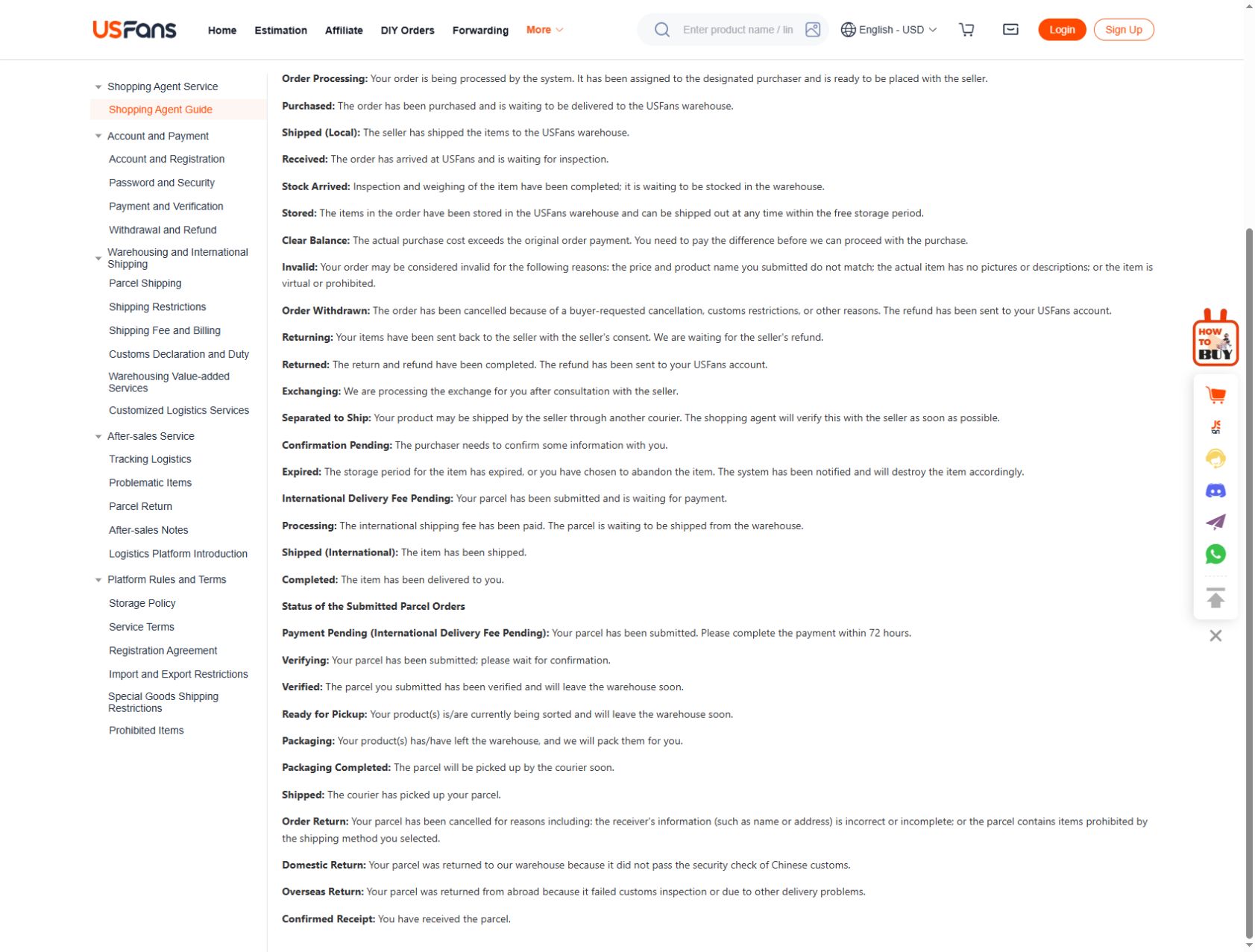
Keep payment evidence separate from fulfilment
A payment receipt describes a transaction. It does not by itself confirm seller dispatch, warehouse inspection or carrier handover. Likewise, an unclear order screen does not prove that a payment failed.
If the two records appear inconsistent, compare the amount, currency, reference and time before repeating an action. A second payment is not an appropriate way to diagnose a missing update. Use the payments guide and payment-failed guide to organise the checks.
When contacting support, explain the specific difference: for example, that one record shows a transaction while the related order state has not provided the expected confirmation. Do not replace that observation with a guessed explanation about the cause.
An example of why two items need two checks
Imagine that you selected a jersey and a cap. The jersey has an arrival record, while the cap does not. This is a hypothetical example, not a reported USFans order. Treating the whole purchase as “arrived” would hide the unresolved cap; treating it all as “not arrived” would ignore the information about the jersey.
Keep each item attached to its own option and events. If you then create a parcel containing only the jersey, later parcel updates should not be read as progress for the cap. The contents of the parcel matter more than the fact that the items were first selected in the same browsing session.
Inspect the Argentina home-jersey candidate on OG
Use that listing to identify the candidate, then use your own item record to check arrival and storage. If recovering your original selection, compare the product and option using the spreadsheet links guide.
Read the latest event with its date
An event without a date is difficult to place. Save the actual wording and the time shown, and note which record it belongs to. If you revisit the page, compare it with that observation instead of relying on a vague impression that nothing changed.
Do not combine screenshots from different products or parcels into one timeline. Similarly, an older event can remain visible after a newer event has appeared elsewhere in the same record. Read the sequence before treating an isolated screenshot as the current state.
The delivery-time guide explains how different starting points change the duration you are measuring. Product payment and international carrier acceptance are not interchangeable clock starts.
Match the question to the stage
| Observation | Question to clarify |
|---|---|
| Payment and order information appear inconsistent | Which transaction belongs to this order, and is any action required? |
| Product arrival is not recorded | What is the latest product-order event, and what happens next? |
| Goods have arrived but a product concern remains | Has the specific option or inspection question been resolved? |
| A parcel has been submitted but handover is unclear | What is the current parcel event, and does it require action from me? |
| Carrier tracking has an unfamiliar update | What does that recorded event mean for this parcel? |
These questions are a way to request clarification, not a declaration that each observation represents a failure. An unchanged status alone does not establish loss, fraud or a particular operational delay.
Do not let a status replace an inspection decision
An arrival event does not settle whether the product matches your selected option. If the colour, quantity or a decisive measurement is unclear, examine the associated information. The QC guide explains how to ask for a useful observation.
If you are considering a product-side remedy, raise that issue before taking a later action that assumes acceptance. The returns guide helps identify the questions to ask without promising the same deadline or outcome for every item.
Conversely, a product question does not automatically mean that the related payment or parcel state is wrong. Keep the issues separate so that the response can address the actual decision.
When to switch to tracking
Once the question concerns the parcel's transport events, use the parcel reference and the relevant tracking information. A product-order reference may not be the information needed to explain a carrier update.
The tracking guide covers those observations. Do not assume that a number being created confirms every later stage. If a carrier event is absent, ask about that uncertainty rather than treating an earlier product status as proof of dispatch.
Write a support request that can be answered
In the appropriate private channel, identify the record and quote the last relevant event. Explain what you expected to learn and ask one concrete question. If there is a related transaction or another item, describe the relationship rather than mixing all the references without explanation.
For example: “This item has the following last event on this date. Can you confirm its current stage and whether I need to do anything before parcel submission?” Fill in your actual observations; do not copy invented details from an example.
Use the support guide for contact preparation. Do not share passwords, one-time codes or unnecessary personal information to make a status question appear more complete.
Common questions
Does one item arriving mean my whole order is ready?
No conclusion about the remaining items follows automatically. Check their individual records and any unresolved product questions.
Does a payment receipt prove the parcel was shipped?
No. A transaction and a transport event describe different actions. Look for the relevant parcel information.
Should I place the order again if the status does not change?
First clarify the existing record and any payment result. Repeating the order may create an additional commitment without resolving the first one.
What if I cannot interpret the exact label?
Keep its wording and ask what it means for that record. Do not substitute a definition from another service or assume that a translated label proves an unrecorded event.